Cambia lingua

Introduction

This documentation lists the public functions which you can send and receive data from SimplyDevelop applications through the POSWS application using REST API calls, with data exchanged in JSon format.


API calls must be sent to the POSWS through TCP port 4055


https://<POSWS_IP_Address>:4055


E.g. localhost url https://127.0.0.1:4055


Each API request must include a SessionCode.

The session expires 30 minutes after the last call or immediately after a new login by the same user with a new SessionCode.


Available Operations


Method

Description

GET

Retrieve records

POST

Create or update records

DELETE

Delete records 

Authentication

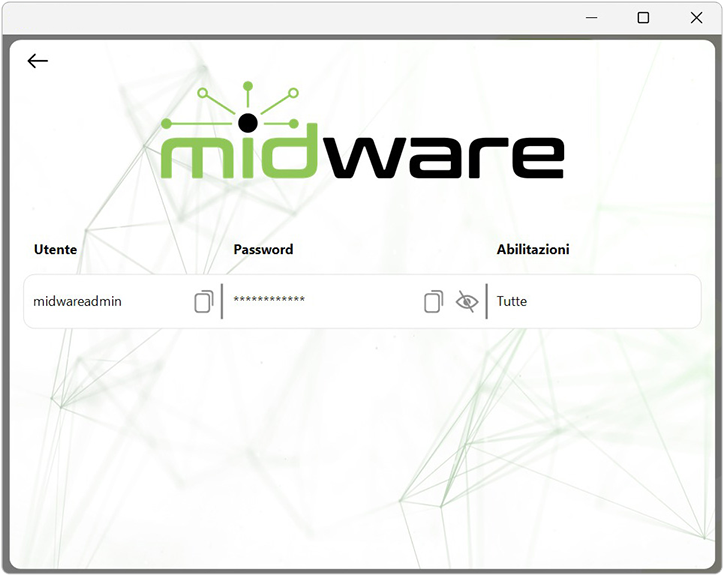
Authentication is Basic Auth type, wwith username and password as specified in POSWS inside the user management of the Midware section. Otherwise with username and password, but via POST request.


Authentication can be done using the standard GET or POST request, as shown in the examples below.


Method

Url

GET

/api/login


Method

Url

Body Text

POST

/api/login


{

    "User": "midwareadmin",

    "Password": "xxxxxxxxxxxxxxxx..."

}

Example Response


{

    "ResponseRequest": "login",

    "SuccessStatus": true,

    "SessionCode": "KG0RNCAYLFDVPNDZHT",

    "User": "midwareadmin",

    "Data": "",

    "LastLogin": "1899-12-30T00:00:00.000+01:00"

}

Orders

Available Fields


Element

Description

Type

Max.

Size

Req’d

Read

Only

Filter

order

idorder

ID Order

INTEGER


orderdate

Order date

DATETIME


registrationdate

Registration date

DATETIME


customername

Customer

STRING

250


customeraddress

Customer address

STRING

100


customerzipcode

Customer zip code

STRING

5


customercity

Customer city

STRING

20


customercountry

Customer country

STRING

2


customerphonenumber

Customer phone number

STRING

30


customeremail

Customer email

STRING

150


customervatcode

Customer vat code

STRING

16


customertaxcode

Customer tax code

STRING

16


customersdi

Customer SDI

STRING

15


customerpec

Customer PEC

STRING

100


orderrows

idroworder

ID Row Order

INTEGER


idproduct

ID Product

INTEGER


idbarcodeproduct

ID Barcode product

INTEGER


productcode

Product code

STRING

30


barcode

Barcode

STRING

13


rowdescription

Row Description. Product Name; Discount Description...

STRING

1000


price

Price

CURRENCY


qtyorder

Quantity order. Quantity of row

DOUBLE


iddepartment

ID Department

INTEGER


departmentcode

Department code

INTEGER


idvat

ID VAT

INTEGER


vatpercentage

VAT percentage value

FLOAT


New

The sales order entry call can be made with a specific POST call, as shown in the example table below.

This call replaces the current receipt on cashier.


Method

POST

Url

/api/neworder

Body Text

{

    "orderdate": "2025-09-15T00:00:00.000+01:00",

    "registrationdate": "2025-09-15T00:00:00.000+01:00",

    "customername": "CLIENTE TEST",

    "customeraddress": "VIA ROMA 1",

    "customerzipcode": "00100",

    "customercity": "ROMA",

    "customercountry": "RM",

    "customerphonenumber": "3333333333",

    "customeremail": "clientetest@email.it",

    "customervatcode": "12345678901",

    "customertaxcode": "12345678901",

    "customersdi": "XXXXXXX",

    "customerpec": "clientetest@pec.it",

    "documentrows": [

        {

            "productcode": "AB1234",

            "barcode": "2500000000000",

            "rowdescription": "PRODOTTO PROVA",

            "price": 4.5,

            "qtyorder": 1,

            "departmentcode": "22",

            "vatpercentage": 22

        },

        {

            "productcode": "AB1235",

            "barcode": "2500000000011",

            "rowdescription": "SECONDO PRODOTTO PROVA",

            "price": 2,

            "qtyorder": 1,

            "departmentcode": "3",

            "vatpercentage": 10

        }

    ]

}

Add

The call to add to the sales order can be made with a specific POST call, as shown in the example table below.

This call adds products to the current receipt on cashier.


Method

POST

Url

/api/addorder

Body Text

{

    "orderdate": "2025-09-15T00:00:00.000+01:00",

    "registrationdate": "2025-09-15T00:00:00.000+01:00",

    "customername": "CLIENTE TEST",

    "customeraddress": "VIA ROMA 1",

    "customerzipcode": "00100",

    "customercity": "ROMA",

    "customercountry": "RM",

    "customerphonenumber": "3333333333",

    "customeremail": "clientetest@email.it",

    "customervatcode": "12345678901",

    "customertaxcode": "12345678901",

    "customersdi": "XXXXXXX",

    "customerpec": "clientetest@pec.it",

    "documentrows": [

        {

            "productcode": "AB1234",

            "barcode": "2500000000000",

            "rowdescription": "PRODOTTO PROVA",

            "price": 4.5,

            "qtyorder": 1,

            "departmentcode": "22",

            "vatpercentage": 22

        },

        {

            "productcode": "AB1235",

            "barcode": "2500000000011",

            "rowdescription": "SECONDO PRODOTTO PROVA",

            "price": 2,

            "qtyorder": 1,

            "departmentcode": "3",

            "vatpercentage": 10

        }

    ]

}